> ## Documentation Index
> Fetch the complete documentation index at: https://docs.linqra.com/llms.txt
> Use this file to discover all available pages before exploring further.
# Local Docker Deployment
> Run all Linqra components in Docker on localhost
## Overview
While we previously ran the discovery-service and api-gateway as standalone applications from the IDE or JAR files, we can also run them through Docker containers. This guide explains how to run all Linqra components using Docker.
## Docker Compose Configuration
The `docker-compose.yml` file includes all necessary services:
* Infrastructure Services:
* PostgreSQL (for Keycloak)
* pgAdmin (PostgreSQL management)
* Keycloak (authentication)
* MongoDB (replica set with 3 nodes)
* Redis (rate limiting and caching)
* Core Services:
* Discovery Server (Eureka)
* API Gateway with HAProxy Load Balancer
## Certificate Preparation
Before running the services, ensure you have the necessary certificates prepared for HAProxy:
```bash theme={null}
# 1. Create haproxy directory
mkdir keys/haproxy
# 2. Export certificate in proper PEM format (this converts from binary to readable PEM)
keytool -exportcert \
-alias gateway-app-container \
-keystore keys/gateway-keystore-container.jks \
-storepass 123456 \
-rfc \
-file keys/haproxy/gateway-cert-container.pem
# 3. Convert JKS to P12
keytool -importkeystore \
-srckeystore keys/gateway-keystore-container.jks \
-destkeystore keys/haproxy/gateway-keystore-container.p12 \
-deststoretype PKCS12 \
-srcalias gateway-app-container \
-srcstorepass 123456 \
-deststorepass 123456
# 4. Extract private key from P12
openssl pkcs12 \
-in keys/haproxy/gateway-keystore-container.p12 \
-nocerts \
-out keys/haproxy/gateway-private-container.pem \
-nodes \
-passin pass:123456
# 5. Combine certificate and private key
cat keys/haproxy/gateway-cert-container.pem keys/haproxy/gateway-private-container.pem > keys/haproxy/gateway-combined-container.pem
```
The final directory structure should look like this:
```text theme={null}
keys/
├── gateway-keystore-container.jks (original keystore)
└── haproxy/
├── gateway-cert-container.pem (exported readable certificate)
├── gateway-keystore-container.p12 (converted keystore)
├── gateway-private-container.pem (extracted private key)
└── gateway-combined-container.pem (combined cert + private key)
```
These certificates should have been generated during the initial setup. This section shows how they were created for reference.
## Running Core Services
To start all core services with Docker Compose:
```bash theme={null}
/usr/local/bin/docker compose -f /Users/mehmetsen/IdeaProjects/Linqra/docker-compose.yml -p linqra up -d --build
```
Here it is how it looks like:
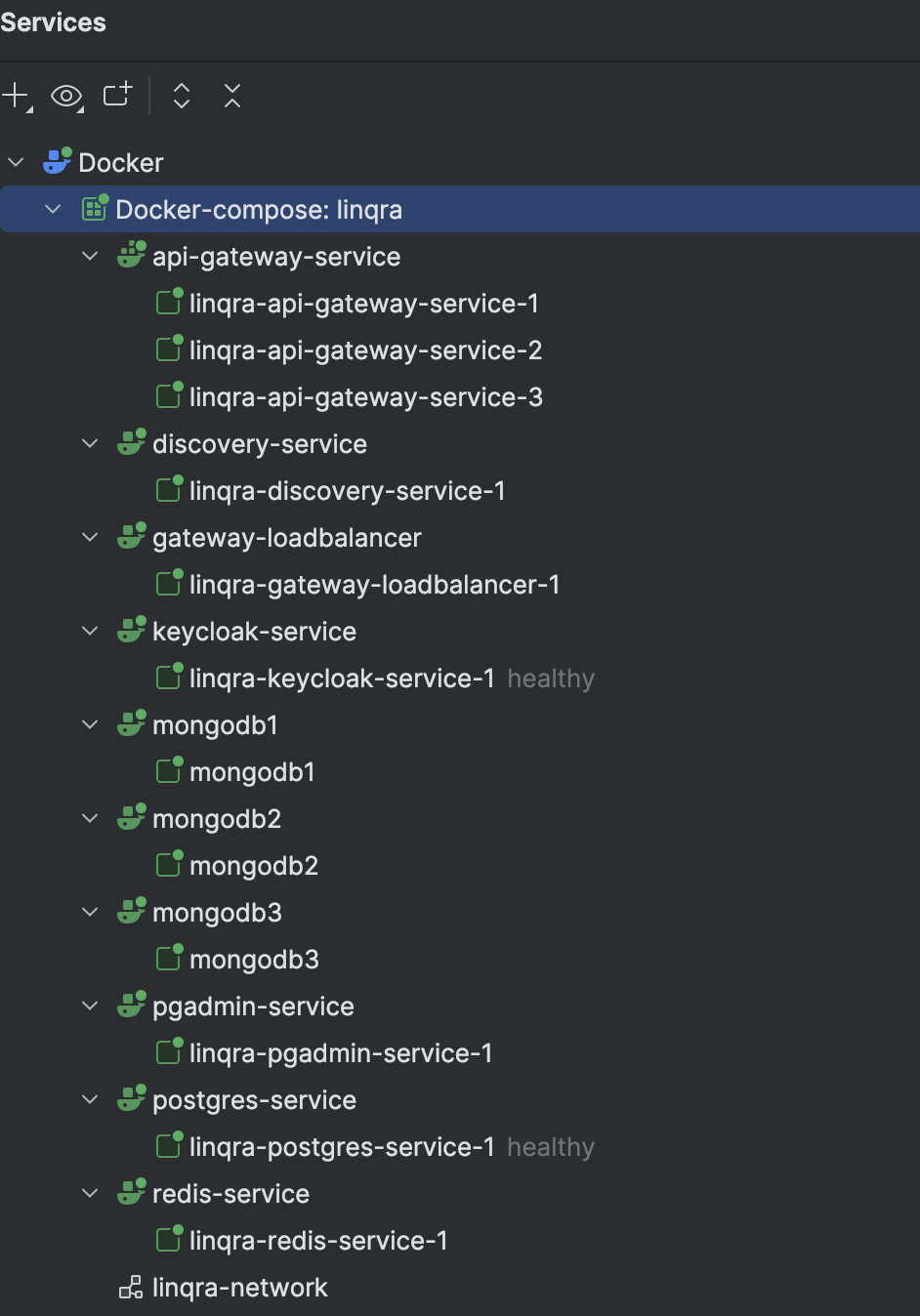 This command:
* Uses the local Docker Compose installation
* Specifies the compose file location
* Sets the project name to 'linqra'
* Runs in detached mode (-d)
* Builds images if needed (--build)
### Rebuilding Individual Services
If you update the api-gateway code or configuration, you can rebuild just that service:
```bash theme={null}
/usr/local/bin/docker compose -f /Users/mehmetsen/IdeaProjects/Linqra/docker-compose.yml -p linqra up -d --build api-gateway-service
```
## Service Configuration
### Discovery Server (Eureka)
```yaml theme={null}
discovery-service:
build:
context: .
dockerfile: .kube/eureka/Dockerfile
environment:
EUREKA_KEY_STORE: eureka-keystore.jks
EUREKA_KEY_STORE_PASSWORD: 123456
EUREKA_TRUST_STORE: eureka-truststore.jks
EUREKA_TRUST_STORE_PASSWORD: 123456
EUREKA_GATEWAY_URL: discovery-service
EUREKA_ALIAS_NAME: eureka-app-container
ports:
- "8761:8761"
volumes:
- ./discovery-server:/app/discovery-server
- ./keys:/app/keys
networks:
- linqra-network
```
### Load Balancer and API Gateway
```yaml theme={null}
# Load Balancer
gateway-loadbalancer:
image: haproxy:2.8
ports:
- "7777:7777"
volumes:
- ./.kube/gateway/haproxy.cfg:/usr/local/etc/haproxy/haproxy.cfg:ro
- ./keys/haproxy/gateway-combined-container.pem:/etc/ssl/gateway-cert.pem:ro
networks:
- linqra-network
depends_on:
- api-gateway-service
# API Gateway Service
api-gateway-service:
build:
context: .
dockerfile: ./.kube/gateway/Dockerfile
environment:
GATEWAY_TRUST_STORE: /app/gateway-truststore.jks
GATEWAY_TRUST_STORE_PASSWORD: 123456
GATEWAY_KEY_STORE: /app/gateway-keystore.jks
GATEWAY_KEY_STORE_PASSWORD: 123456
GATEWAY_API_HOST: api-gateway-service
GATEWAY_ALIAS_NAME: gateway-app-container
REDIS_GATEWAY_URL: redis-service
MONGO_GATEWAY_URL: "mongodb://root:mongopw@mongodb1:27017,mongodb2:27018,mongodb3:27019/admin?replicaSet=rs0"
KEYCLOAK_GATEWAY_URL: keycloak-service
KEYCLOAK_GATEWAY_PORT: 8080
EUREKA_GATEWAY_URL: discovery-service
EUREKA_INSTANCE_URL: api-gateway-service
SLACK_ENABLED: false
SLACK_WEBHOOK_URL: https://hooks.slack.com/services/T00000000/B00000000/XXXXXXXXXXXXXXXXXXXXXXXX
SMTP_ENABLED: false
SMTP_PASSWORD: 123456
SMTP_USERNAME: abcdef
volumes:
- ./api-gateway:/app/api-gateway
- ./keys:/app/keys
deploy:
replicas: 3
restart_policy:
condition: on-failure
expose:
- "7777"
networks:
- linqra-network
depends_on:
- discovery-service
- mongodb1
- mongodb2
- mongodb3
- keycloak-service
- redis-service
```
The API Gateway service is configured with 3 replicas for high availability, with HAProxy load balancing requests across these instances through port 7777.
## Complete Docker Compose Configuration
Below is the complete `docker-compose.yml` file for local deployment:
```yaml theme={null}
networks:
linqra-network:
external: true
services:
# PostgreSQL Database
postgres-service:
build:
context: .
dockerfile: ./.kube/postgres/Dockerfile
command: postgres -c "max_connections=200"
restart: always
ports:
- "5432:5432"
healthcheck:
test: [ "CMD-SHELL", "pg_isready -U ${POSTGRES_USER} -d ${POSTGRES_DB}" ]
interval: 10s
timeout: 3s
retries: 3
volumes:
- ./.kube/postgres/data/:/var/lib/postgresql/data
environment:
POSTGRES_DB: keycloak
POSTGRES_USER: keycloak
POSTGRES_PASSWORD: password
networks:
- linqra-network
# PostgreSQL Admin Interface
pgadmin-service:
build:
context: .
dockerfile: ./.kube/pgadmin/Dockerfile
restart: always
ports:
- "9090:80"
environment:
PGADMIN_DEFAULT_EMAIL: user-name@domain-name.com
PGADMIN_DEFAULT_PASSWORD: strong-password
volumes:
- ./.kube/pgadmin/data/:/var/lib/pgadmin
networks:
- linqra-network
# Keycloak Authentication Service
keycloak-service:
build:
context: .
dockerfile: ./.kube/keycloak/Dockerfile
environment:
KC_DB: postgres
KC_DB_URL: jdbc:postgresql://postgres-service:5432/keycloak
KC_DB_USERNAME: keycloak
KC_DB_PASSWORD: password
KC_HTTP_ENABLED: true
KC_HTTP_PORT: 8080
KC_HOSTNAME: localhost
KC_HOSTNAME_PORT: 8281
KC_HOSTNAME_STRICT: false
KC_LOG_LEVEL: info
KC_METRICS_ENABLED: true
KC_HEALTH_ENABLED: true
KEYCLOAK_ADMIN: admin
KEYCLOAK_ADMIN_PASSWORD: admin
command:
- start-dev
- --import-realm
- --export-realm
volumes:
- .kube/keycloak/data/import:/opt/keycloak/data/import
- .kube/keycloak/data/export:/opt/keycloak/data/export
depends_on:
postgres-service:
condition: service_healthy
healthcheck:
test: ["CMD-SHELL", "exec 3<>/dev/tcp/127.0.0.1/9000;echo -e 'GET /health/ready HTTP/1.1\r\nhost: http://localhost\r\nConnection: close\r\n\r\n' >&3;if [ $? -eq 0 ]; then echo 'Healthcheck Successful';exit 0;else echo 'Healthcheck Failed';exit 1;fi;"]
interval: 10s
timeout: 3s
retries: 3
ports:
- "8281:8080"
networks:
- linqra-network
# MongoDB Replica Set
mongodb1:
deploy:
resources:
limits:
cpus: '1.0'
memory: 1G
build:
context: .
dockerfile: ./.kube/mongodb/Dockerfile
container_name: mongodb1
environment:
MONGO_INITDB_ROOT_USERNAME: root
MONGO_INITDB_ROOT_PASSWORD: mongopw
MONGO_REPLICA_SET_NAME: rs0
ports:
- "27017:27017"
volumes:
- ./.kube/mongodb/data1/:/data/db
- ./.kube/mongodb/mongo-keyfile:/data/mongo-keyfile
networks:
- linqra-network
command: mongod --bind_ip_all --replSet rs0 --port 27017 -keyFile /data/mongo-keyfile
mongodb2:
deploy:
resources:
limits:
cpus: '1.0'
memory: 1G
build:
context: .
dockerfile: ./.kube/mongodb/Dockerfile
container_name: mongodb2
environment:
MONGO_INITDB_ROOT_USERNAME: root
MONGO_INITDB_ROOT_PASSWORD: mongopw
MONGO_REPLICA_SET_NAME: rs0
ports:
- "27018:27018"
volumes:
- ./.kube/mongodb/data2/:/data/db
- ./.kube/mongodb/mongo-keyfile:/data/mongo-keyfile
networks:
- linqra-network
command: mongod --bind_ip_all --replSet rs0 --port 27018 -keyFile /data/mongo-keyfile
mongodb3:
deploy:
resources:
limits:
cpus: '1.0'
memory: 1G
build:
context: .
dockerfile: ./.kube/mongodb/Dockerfile
container_name: mongodb3
environment:
MONGO_INITDB_ROOT_USERNAME: root
MONGO_INITDB_ROOT_PASSWORD: mongopw
MONGO_REPLICA_SET_NAME: rs0
ports:
- "27019:27019"
volumes:
- ./.kube/mongodb/data3/:/data/db
- ./.kube/mongodb/mongo-keyfile:/data/mongo-keyfile
networks:
- linqra-network
command: mongod --bind_ip_all --replSet rs0 --port 27019 -keyFile /data/mongo-keyfile
# Redis Cache
redis-service:
build:
context: .
dockerfile: ./.kube/redis/Dockerfile
environment:
REDIS_GATEWAY_URL: redis-service
ports:
- "6379:6379"
volumes:
- ./.kube/redis/data/:/var/lib/redis/data
- ./.kube/redis/redis.conf:/usr/local/etc/redis/redis.conf
command: ["redis-server", "/usr/local/etc/redis/redis.conf"]
networks:
- linqra-network
# Discovery Server (Eureka)
discovery-service:
build:
context: .
dockerfile: .kube/eureka/Dockerfile
environment:
EUREKA_KEY_STORE: eureka-keystore.jks
EUREKA_KEY_STORE_PASSWORD: 123456
EUREKA_TRUST_STORE: eureka-truststore.jks
EUREKA_TRUST_STORE_PASSWORD: 123456
EUREKA_GATEWAY_URL: discovery-service
EUREKA_ALIAS_NAME: eureka-app-container
ports:
- "8761:8761"
volumes:
- ./discovery-server:/app/discovery-server
- ./keys:/app/keys
networks:
- linqra-network
# Load Balancer
gateway-loadbalancer:
image: haproxy:2.8
ports:
- "7777:7777"
volumes:
- ./.kube/gateway/haproxy.cfg:/usr/local/etc/haproxy/haproxy.cfg:ro
- ./keys/haproxy/gateway-combined-container.pem:/etc/ssl/gateway-cert.pem:ro
networks:
- linqra-network
depends_on:
- api-gateway-service
# API Gateway Service
api-gateway-service:
build:
context: .
dockerfile: ./.kube/gateway/Dockerfile
environment:
GATEWAY_TRUST_STORE: /app/gateway-truststore.jks
GATEWAY_TRUST_STORE_PASSWORD: 123456
GATEWAY_KEY_STORE: /app/gateway-keystore.jks
GATEWAY_KEY_STORE_PASSWORD: 123456
GATEWAY_API_HOST: api-gateway-service
GATEWAY_ALIAS_NAME: gateway-app-container
REDIS_GATEWAY_URL: redis-service
MONGO_GATEWAY_URL: "mongodb://root:mongopw@mongodb1:27017,mongodb2:27018,mongodb3:27019/admin?replicaSet=rs0"
KEYCLOAK_GATEWAY_URL: keycloak-service
KEYCLOAK_GATEWAY_PORT: 8080
EUREKA_GATEWAY_URL: discovery-service
EUREKA_INSTANCE_URL: api-gateway-service
SLACK_ENABLED: false
SLACK_WEBHOOK_URL: https://hooks.slack.com/services/T00000000/B00000000/XXXXXXXXXXXXXXXXXXXXXXXX
SMTP_ENABLED: false
SMTP_PASSWORD: 123456
SMTP_USERNAME: abcdef
volumes:
- ./api-gateway:/app/api-gateway
- ./keys:/app/keys
deploy:
replicas: 3
restart_policy:
condition: on-failure
expose:
- "7777"
networks:
- linqra-network
depends_on:
- discovery-service
- mongodb1
- mongodb2
- mongodb3
- keycloak-service
- redis-service
```
This configuration is specifically designed for local development and testing. The services are configured to run on localhost with appropriate port mappings and network settings.
## Client Services
After setting up the core infrastructure and gateway services, you can deploy the example client services. Each service is configured to run with multiple instances for high availability.
### Product Service
The product service uses its own Docker configuration and certificates:
```yaml theme={null}
networks:
linqra-network:
external: true
services:
product-service:
build:
context: .
dockerfile: ./.kube/product/Dockerfile
environment:
CLIENT_TRUST_STORE: /app/client-truststore.jks
CLIENT_TRUST_STORE_PASSWORD: 123456
CLIENT_KEY_STORE: /app/client-keystore.jks
CLIENT_KEY_STORE_PASSWORD: 123456
CLIENT_ALIAS_NAME: product-service-container
EUREKA_CLIENT_URL: discovery-service
EUREKA_INSTANCE_URL: product-service
KEYCLOAK_GATEWAY_URL: keycloak-service
KEYCLOAK_GATEWAY_PORT: 8080
GATEWAY_SERVICE_URL: api-gateway-service
deploy:
replicas: 3
networks:
- linqra-network
volumes:
- ./:/app/product-service
- ./keys:/app/keys
```
To deploy the product service:
```bash theme={null}
/usr/local/bin/docker compose -f /Users/mehmetsen/IdeaProjects/linqra_product_service/docker-compose.yml -p linqra_product_service up -d --build product-service
```
This will create three instances of the product service:
* linqra\_product\_service-product-service-1
* linqra\_product\_service-product-service-2
* linqra\_product\_service-product-service-3
This command:
* Uses the local Docker Compose installation
* Specifies the compose file location
* Sets the project name to 'linqra'
* Runs in detached mode (-d)
* Builds images if needed (--build)
### Rebuilding Individual Services
If you update the api-gateway code or configuration, you can rebuild just that service:
```bash theme={null}
/usr/local/bin/docker compose -f /Users/mehmetsen/IdeaProjects/Linqra/docker-compose.yml -p linqra up -d --build api-gateway-service
```
## Service Configuration
### Discovery Server (Eureka)
```yaml theme={null}
discovery-service:
build:
context: .
dockerfile: .kube/eureka/Dockerfile
environment:
EUREKA_KEY_STORE: eureka-keystore.jks
EUREKA_KEY_STORE_PASSWORD: 123456
EUREKA_TRUST_STORE: eureka-truststore.jks
EUREKA_TRUST_STORE_PASSWORD: 123456
EUREKA_GATEWAY_URL: discovery-service
EUREKA_ALIAS_NAME: eureka-app-container
ports:
- "8761:8761"
volumes:
- ./discovery-server:/app/discovery-server
- ./keys:/app/keys
networks:
- linqra-network
```
### Load Balancer and API Gateway
```yaml theme={null}
# Load Balancer
gateway-loadbalancer:
image: haproxy:2.8
ports:
- "7777:7777"
volumes:
- ./.kube/gateway/haproxy.cfg:/usr/local/etc/haproxy/haproxy.cfg:ro
- ./keys/haproxy/gateway-combined-container.pem:/etc/ssl/gateway-cert.pem:ro
networks:
- linqra-network
depends_on:
- api-gateway-service
# API Gateway Service
api-gateway-service:
build:
context: .
dockerfile: ./.kube/gateway/Dockerfile
environment:
GATEWAY_TRUST_STORE: /app/gateway-truststore.jks
GATEWAY_TRUST_STORE_PASSWORD: 123456
GATEWAY_KEY_STORE: /app/gateway-keystore.jks
GATEWAY_KEY_STORE_PASSWORD: 123456
GATEWAY_API_HOST: api-gateway-service
GATEWAY_ALIAS_NAME: gateway-app-container
REDIS_GATEWAY_URL: redis-service
MONGO_GATEWAY_URL: "mongodb://root:mongopw@mongodb1:27017,mongodb2:27018,mongodb3:27019/admin?replicaSet=rs0"
KEYCLOAK_GATEWAY_URL: keycloak-service
KEYCLOAK_GATEWAY_PORT: 8080
EUREKA_GATEWAY_URL: discovery-service
EUREKA_INSTANCE_URL: api-gateway-service
SLACK_ENABLED: false
SLACK_WEBHOOK_URL: https://hooks.slack.com/services/T00000000/B00000000/XXXXXXXXXXXXXXXXXXXXXXXX
SMTP_ENABLED: false
SMTP_PASSWORD: 123456
SMTP_USERNAME: abcdef
volumes:
- ./api-gateway:/app/api-gateway
- ./keys:/app/keys
deploy:
replicas: 3
restart_policy:
condition: on-failure
expose:
- "7777"
networks:
- linqra-network
depends_on:
- discovery-service
- mongodb1
- mongodb2
- mongodb3
- keycloak-service
- redis-service
```
The API Gateway service is configured with 3 replicas for high availability, with HAProxy load balancing requests across these instances through port 7777.
## Complete Docker Compose Configuration
Below is the complete `docker-compose.yml` file for local deployment:
```yaml theme={null}
networks:
linqra-network:
external: true
services:
# PostgreSQL Database
postgres-service:
build:
context: .
dockerfile: ./.kube/postgres/Dockerfile
command: postgres -c "max_connections=200"
restart: always
ports:
- "5432:5432"
healthcheck:
test: [ "CMD-SHELL", "pg_isready -U ${POSTGRES_USER} -d ${POSTGRES_DB}" ]
interval: 10s
timeout: 3s
retries: 3
volumes:
- ./.kube/postgres/data/:/var/lib/postgresql/data
environment:
POSTGRES_DB: keycloak
POSTGRES_USER: keycloak
POSTGRES_PASSWORD: password
networks:
- linqra-network
# PostgreSQL Admin Interface
pgadmin-service:
build:
context: .
dockerfile: ./.kube/pgadmin/Dockerfile
restart: always
ports:
- "9090:80"
environment:
PGADMIN_DEFAULT_EMAIL: user-name@domain-name.com
PGADMIN_DEFAULT_PASSWORD: strong-password
volumes:
- ./.kube/pgadmin/data/:/var/lib/pgadmin
networks:
- linqra-network
# Keycloak Authentication Service
keycloak-service:
build:
context: .
dockerfile: ./.kube/keycloak/Dockerfile
environment:
KC_DB: postgres
KC_DB_URL: jdbc:postgresql://postgres-service:5432/keycloak
KC_DB_USERNAME: keycloak
KC_DB_PASSWORD: password
KC_HTTP_ENABLED: true
KC_HTTP_PORT: 8080
KC_HOSTNAME: localhost
KC_HOSTNAME_PORT: 8281
KC_HOSTNAME_STRICT: false
KC_LOG_LEVEL: info
KC_METRICS_ENABLED: true
KC_HEALTH_ENABLED: true
KEYCLOAK_ADMIN: admin
KEYCLOAK_ADMIN_PASSWORD: admin
command:
- start-dev
- --import-realm
- --export-realm
volumes:
- .kube/keycloak/data/import:/opt/keycloak/data/import
- .kube/keycloak/data/export:/opt/keycloak/data/export
depends_on:
postgres-service:
condition: service_healthy
healthcheck:
test: ["CMD-SHELL", "exec 3<>/dev/tcp/127.0.0.1/9000;echo -e 'GET /health/ready HTTP/1.1\r\nhost: http://localhost\r\nConnection: close\r\n\r\n' >&3;if [ $? -eq 0 ]; then echo 'Healthcheck Successful';exit 0;else echo 'Healthcheck Failed';exit 1;fi;"]
interval: 10s
timeout: 3s
retries: 3
ports:
- "8281:8080"
networks:
- linqra-network
# MongoDB Replica Set
mongodb1:
deploy:
resources:
limits:
cpus: '1.0'
memory: 1G
build:
context: .
dockerfile: ./.kube/mongodb/Dockerfile
container_name: mongodb1
environment:
MONGO_INITDB_ROOT_USERNAME: root
MONGO_INITDB_ROOT_PASSWORD: mongopw
MONGO_REPLICA_SET_NAME: rs0
ports:
- "27017:27017"
volumes:
- ./.kube/mongodb/data1/:/data/db
- ./.kube/mongodb/mongo-keyfile:/data/mongo-keyfile
networks:
- linqra-network
command: mongod --bind_ip_all --replSet rs0 --port 27017 -keyFile /data/mongo-keyfile
mongodb2:
deploy:
resources:
limits:
cpus: '1.0'
memory: 1G
build:
context: .
dockerfile: ./.kube/mongodb/Dockerfile
container_name: mongodb2
environment:
MONGO_INITDB_ROOT_USERNAME: root
MONGO_INITDB_ROOT_PASSWORD: mongopw
MONGO_REPLICA_SET_NAME: rs0
ports:
- "27018:27018"
volumes:
- ./.kube/mongodb/data2/:/data/db
- ./.kube/mongodb/mongo-keyfile:/data/mongo-keyfile
networks:
- linqra-network
command: mongod --bind_ip_all --replSet rs0 --port 27018 -keyFile /data/mongo-keyfile
mongodb3:
deploy:
resources:
limits:
cpus: '1.0'
memory: 1G
build:
context: .
dockerfile: ./.kube/mongodb/Dockerfile
container_name: mongodb3
environment:
MONGO_INITDB_ROOT_USERNAME: root
MONGO_INITDB_ROOT_PASSWORD: mongopw
MONGO_REPLICA_SET_NAME: rs0
ports:
- "27019:27019"
volumes:
- ./.kube/mongodb/data3/:/data/db
- ./.kube/mongodb/mongo-keyfile:/data/mongo-keyfile
networks:
- linqra-network
command: mongod --bind_ip_all --replSet rs0 --port 27019 -keyFile /data/mongo-keyfile
# Redis Cache
redis-service:
build:
context: .
dockerfile: ./.kube/redis/Dockerfile
environment:
REDIS_GATEWAY_URL: redis-service
ports:
- "6379:6379"
volumes:
- ./.kube/redis/data/:/var/lib/redis/data
- ./.kube/redis/redis.conf:/usr/local/etc/redis/redis.conf
command: ["redis-server", "/usr/local/etc/redis/redis.conf"]
networks:
- linqra-network
# Discovery Server (Eureka)
discovery-service:
build:
context: .
dockerfile: .kube/eureka/Dockerfile
environment:
EUREKA_KEY_STORE: eureka-keystore.jks
EUREKA_KEY_STORE_PASSWORD: 123456
EUREKA_TRUST_STORE: eureka-truststore.jks
EUREKA_TRUST_STORE_PASSWORD: 123456
EUREKA_GATEWAY_URL: discovery-service
EUREKA_ALIAS_NAME: eureka-app-container
ports:
- "8761:8761"
volumes:
- ./discovery-server:/app/discovery-server
- ./keys:/app/keys
networks:
- linqra-network
# Load Balancer
gateway-loadbalancer:
image: haproxy:2.8
ports:
- "7777:7777"
volumes:
- ./.kube/gateway/haproxy.cfg:/usr/local/etc/haproxy/haproxy.cfg:ro
- ./keys/haproxy/gateway-combined-container.pem:/etc/ssl/gateway-cert.pem:ro
networks:
- linqra-network
depends_on:
- api-gateway-service
# API Gateway Service
api-gateway-service:
build:
context: .
dockerfile: ./.kube/gateway/Dockerfile
environment:
GATEWAY_TRUST_STORE: /app/gateway-truststore.jks
GATEWAY_TRUST_STORE_PASSWORD: 123456
GATEWAY_KEY_STORE: /app/gateway-keystore.jks
GATEWAY_KEY_STORE_PASSWORD: 123456
GATEWAY_API_HOST: api-gateway-service
GATEWAY_ALIAS_NAME: gateway-app-container
REDIS_GATEWAY_URL: redis-service
MONGO_GATEWAY_URL: "mongodb://root:mongopw@mongodb1:27017,mongodb2:27018,mongodb3:27019/admin?replicaSet=rs0"
KEYCLOAK_GATEWAY_URL: keycloak-service
KEYCLOAK_GATEWAY_PORT: 8080
EUREKA_GATEWAY_URL: discovery-service
EUREKA_INSTANCE_URL: api-gateway-service
SLACK_ENABLED: false
SLACK_WEBHOOK_URL: https://hooks.slack.com/services/T00000000/B00000000/XXXXXXXXXXXXXXXXXXXXXXXX
SMTP_ENABLED: false
SMTP_PASSWORD: 123456
SMTP_USERNAME: abcdef
volumes:
- ./api-gateway:/app/api-gateway
- ./keys:/app/keys
deploy:
replicas: 3
restart_policy:
condition: on-failure
expose:
- "7777"
networks:
- linqra-network
depends_on:
- discovery-service
- mongodb1
- mongodb2
- mongodb3
- keycloak-service
- redis-service
```
This configuration is specifically designed for local development and testing. The services are configured to run on localhost with appropriate port mappings and network settings.
## Client Services
After setting up the core infrastructure and gateway services, you can deploy the example client services. Each service is configured to run with multiple instances for high availability.
### Product Service
The product service uses its own Docker configuration and certificates:
```yaml theme={null}
networks:
linqra-network:
external: true
services:
product-service:
build:
context: .
dockerfile: ./.kube/product/Dockerfile
environment:
CLIENT_TRUST_STORE: /app/client-truststore.jks
CLIENT_TRUST_STORE_PASSWORD: 123456
CLIENT_KEY_STORE: /app/client-keystore.jks
CLIENT_KEY_STORE_PASSWORD: 123456
CLIENT_ALIAS_NAME: product-service-container
EUREKA_CLIENT_URL: discovery-service
EUREKA_INSTANCE_URL: product-service
KEYCLOAK_GATEWAY_URL: keycloak-service
KEYCLOAK_GATEWAY_PORT: 8080
GATEWAY_SERVICE_URL: api-gateway-service
deploy:
replicas: 3
networks:
- linqra-network
volumes:
- ./:/app/product-service
- ./keys:/app/keys
```
To deploy the product service:
```bash theme={null}
/usr/local/bin/docker compose -f /Users/mehmetsen/IdeaProjects/linqra_product_service/docker-compose.yml -p linqra_product_service up -d --build product-service
```
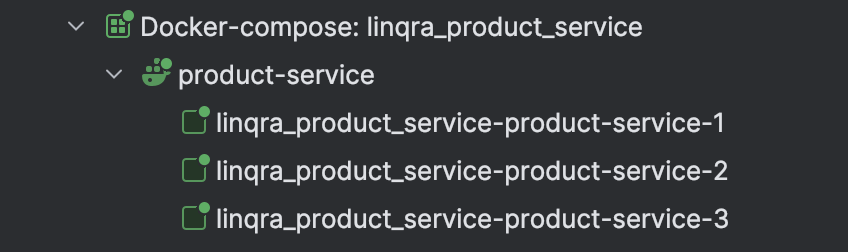
This will create three instances of the product service:
* linqra\_product\_service-product-service-1
* linqra\_product\_service-product-service-2
* linqra\_product\_service-product-service-3
 ### Inventory Service
Similar to the product service, the inventory service has its own Docker configuration:
```yaml theme={null}
networks:
linqra-network:
external: true
services:
inventory-service:
build:
context: .
dockerfile: ./.kube/inventory/Dockerfile
environment:
CLIENT_TRUST_STORE: /app/client-truststore.jks
CLIENT_TRUST_STORE_PASSWORD: 123456
CLIENT_KEY_STORE: /app/client-keystore.jks
CLIENT_KEY_STORE_PASSWORD: 123456
CLIENT_ALIAS_NAME: inventory-service-container
EUREKA_CLIENT_URL: discovery-service
EUREKA_INSTANCE_URL: inventory-service
KEYCLOAK_GATEWAY_URL: keycloak-service
KEYCLOAK_GATEWAY_PORT: 8080
GATEWAY_SERVICE_URL: api-gateway-service
deploy:
replicas: 3
networks:
- linqra-network
volumes:
- ./:/app/inventory-service
- ./keys:/app/keys
```
To deploy the inventory service:
```bash theme={null}
/usr/local/bin/docker compose -f /Users/mehmetsen/IdeaProjects/linqra_inventory_service/docker-compose.yml -p linqra_inventory_service up -d --build
```
This will create three instances of the inventory service:
* linqra\_inventory\_service-inventory-service-1
* linqra\_inventory\_service-inventory-service-2
* linqra\_inventory\_service-inventory-service-3
### Inventory Service
Similar to the product service, the inventory service has its own Docker configuration:
```yaml theme={null}
networks:
linqra-network:
external: true
services:
inventory-service:
build:
context: .
dockerfile: ./.kube/inventory/Dockerfile
environment:
CLIENT_TRUST_STORE: /app/client-truststore.jks
CLIENT_TRUST_STORE_PASSWORD: 123456
CLIENT_KEY_STORE: /app/client-keystore.jks
CLIENT_KEY_STORE_PASSWORD: 123456
CLIENT_ALIAS_NAME: inventory-service-container
EUREKA_CLIENT_URL: discovery-service
EUREKA_INSTANCE_URL: inventory-service
KEYCLOAK_GATEWAY_URL: keycloak-service
KEYCLOAK_GATEWAY_PORT: 8080
GATEWAY_SERVICE_URL: api-gateway-service
deploy:
replicas: 3
networks:
- linqra-network
volumes:
- ./:/app/inventory-service
- ./keys:/app/keys
```
To deploy the inventory service:
```bash theme={null}
/usr/local/bin/docker compose -f /Users/mehmetsen/IdeaProjects/linqra_inventory_service/docker-compose.yml -p linqra_inventory_service up -d --build
```
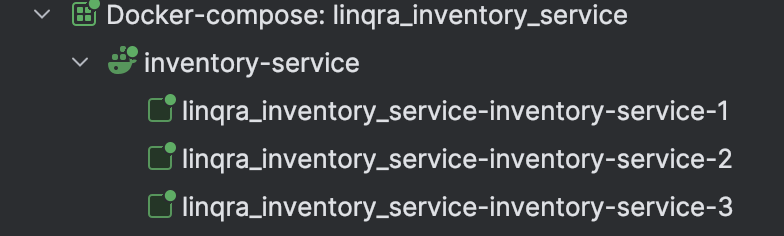
This will create three instances of the inventory service:
* linqra\_inventory\_service-inventory-service-1
* linqra\_inventory\_service-inventory-service-2
* linqra\_inventory\_service-inventory-service-3
 Both services use their own SSL certificates:
* Product Service: `product-keystore-container.jks` and `client-truststore.jks`
* Inventory Service: `inventory-keystore-container.jks` and `client-truststore.jks`
The certificates are mounted into the containers and used for secure communication with other services.
### Service Architecture
Each client service:
* Runs with 3 replicas for high availability
* Uses SSL for secure communication
* Registers with Eureka discovery service
* Communicates through the API Gateway
* Authenticates via Keycloak
* Shares the same Docker network (`linqra-network`) with core services
Both services use their own SSL certificates:
* Product Service: `product-keystore-container.jks` and `client-truststore.jks`
* Inventory Service: `inventory-keystore-container.jks` and `client-truststore.jks`
The certificates are mounted into the containers and used for secure communication with other services.
### Service Architecture
Each client service:
* Runs with 3 replicas for high availability
* Uses SSL for secure communication
* Registers with Eureka discovery service
* Communicates through the API Gateway
* Authenticates via Keycloak
* Shares the same Docker network (`linqra-network`) with core services